

According to a 2018 National Association of Realtors study, 93% of realtors prefer to communicate through email. What this means for many realtors, is that is has become more important than ever before to not only create an email marketing campaign but to also make a GOOD email marketing campaign.
As we know, realtors (and many of today’s demographic) are too busy to read a full email from start to finish. And if we do, we must be bored or strangely, have the time. For this reason, videos have become the main attraction in email as it helps to capture the attention of our target audience, that many words or long-texts cannot.
But once you have a video created, how do you use it in your email campaign? And most importantly, how do you embed it in your email campaign.
6 Steps for using and embedding video in your email campaign:
1. Develop an email campaign strategy
What campaigns will you be sending, how often will you be sending these campaigns? How will you measure the success of these campaigns? See the example below.
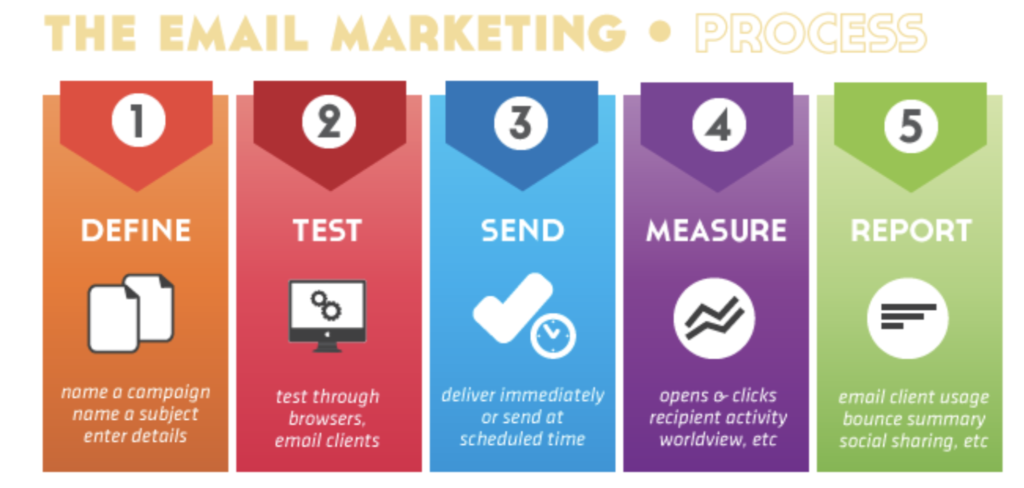
Source from: (Scott, 2019)
2. Gather contacts for your email campaigns.
Who are you going to send your emails to? Current clients, past clients, future prospects? Maybe it is that you have multiple email contact lists in which you send out entirely different email campaigns. To keep track of your email contacts list you can easily use a Microsoft Excel Sheet, Apple Pages, Google sheets or any other spreadsheet tracker. This is the best way to keep track of emails.
*Pro-tip: Separate each contact by the first name, last name, email address, and any other relevant fields.

3. Create an email template in accordance with your branding.
The simplest method is using your regular account on Gmail, Outlook or similar email services to create an email with a combination of text and images. In part 4, we’ll demonstrate how you can build an informative email in just a couple of minutes using these types of accounts to direct your audience to your Market Report Video.
For more graphically advanced templates, there are many free email templates and email platforms you can use such as Canva, Mailjet, Mailchimp, etc. For instance, Canva has hundreds of email templates to choose from in their email template gallery.
4. Prepare your text and CTAs
Keep it short and interesting. Remember that your text shouldn’t repeat what the video contains; rather, its purpose is guiding your audience to watch your video.
CTA, or call or action, is (engage and open the door for reply backs)
weave in the word ‘video’ in the subject line of your email. An example could be ‘watch my latest video for listing’
“video
4. Embed your market update video directly into your email
Embedding your email campaign (and other related content) right in your email will create a stronger impression on your audience than plain text. You can intrigue your audience to stay more engaged with content that you share with them.
Simple method: embedding videos in Gmail, Outlook and similar email services
- First, take a screenshot image of the opening slide of your video to represent that the video entails.
- On Outlook: Create a new message; then, go to the Insert tab and click on Pictures. This will open up an upload window where you can navigate to the file of your screenshot on your computer and add it to your email. After the image appears in your email body, right-click on it and select Hyperlink. A dialog box will open up. Paste the URL of your Roomvu profile/video in the Address field.
- On Gmail, create a new message, then click the Picture icon and in the Insert Photo dialog box go to the Upload tab. Click the Insert images inline button to make sure that when you upload it, it doesn’t appear as a regular attachment. Navigate to the image file on your computer, and once it’s uploaded, it will automatically be inserted into your email. Click on the image in the email or and then click the Hyperlink button to add the link to your Roomvu profile/video.
- If you have opted for a newsletter service, be sure to see what options they offer for embedding images and GIFs in a newsletter.
To embed a video in your email template either:
- Use a template that embeds the video for you (Canva has many options and a tutorial on how to embed a video using one of their templates.
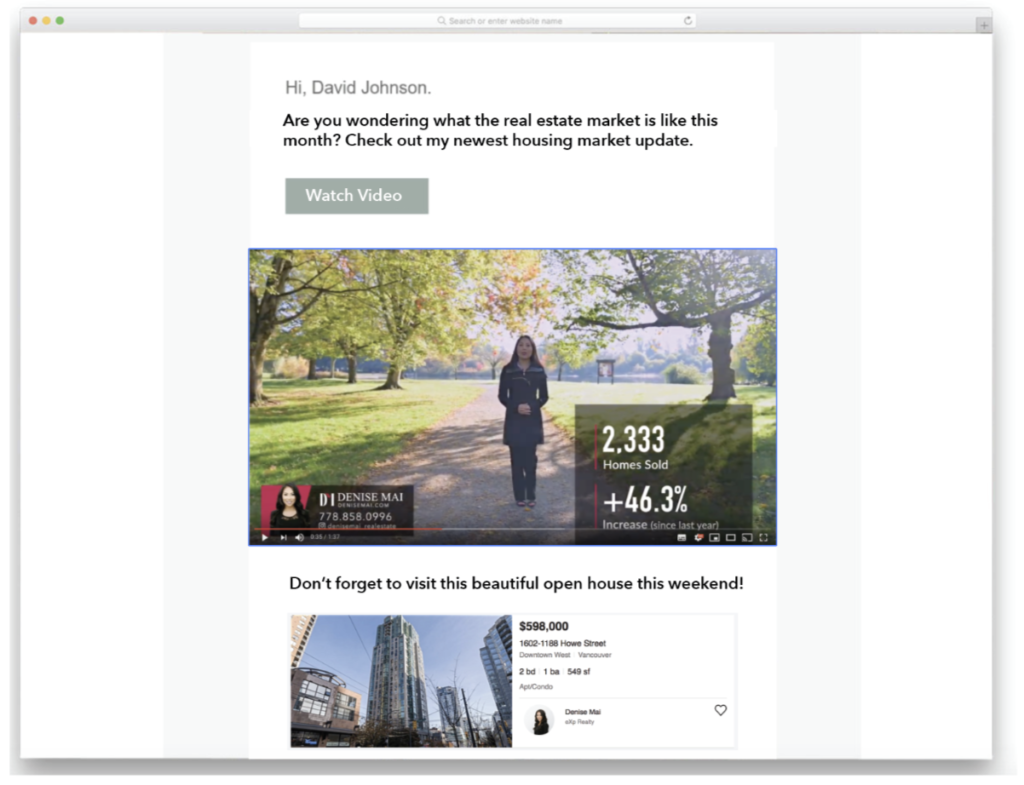
This is what your Market Report video email template could look like once you have embedded it in your email
5. Check your email campaign reports and take action through follow up emails
To check your email campaign reports, there are many different types of analytics plug-ins you can use. Such as Mailtrack a Google Chrome plug-in for Gmail, Microsoft My Analytics for Outlook, Mailbutler for Apple or Google mail or even Google Analytics
Use these online tools to see how many of your recipients are receiving your emails, opening your mail and more. This way you can make appropriate changes to your email campaigns and more.
Want more real estate related content?
Subscribe to our blog: www.roomvustore.com/blog
References:
National Association of Realtors, 2018. Real Estate in a Digital Age 2018 Report. Retrieved from: https://www.nar.realtor/sites/default/files/documents/2018-real-estate-in-a-digital-world-12-12-2018.pdf
Scott, 2019. How to create a great email marketing campaign strategy. Retrieved from: https://www.dcdevshop.com/create-a-great-email-marketing-campaign-strategy/